
Best Campaign Tracking Free Tool: How to Track Every Marketing Click in Real Time
Running marketing campaigns without accurate click data is the fastest way to burn through your budget. Discover how to use a all-in-one campaign tracking free tool to build spotless UTM links, cloak ugly tracking parameters behind custom short URLs, and monitor real-time audience analytics without hitting a paywall.
Launching a marketing campaign across WhatsApp, Instagram, email newsletters, and paid ads takes hours of preparation. Yet the moment your links go live, a frustrating question usually follows: Which channel is actually driving results, and which one is wasting your time?
Most marketers and business owners run into one of two roadblocks. Either they share raw, untagged links and end up with a giant pile of mysterious "Direct" traffic in their analytics, or they use traditional link management platforms that lock basic click data, UTM builders, and custom aliases behind $30- to $200-per-month subscription walls.
You shouldn't have to pay an enterprise software tax just to know who clicked your link. Using a dedicated campaign tracking free tool like Go BitUrl gives you complete visibility over every link you share—combining a built-in UTM builder, branded short links, downloadable QR codes, and live click telemetry in a single free dashboard.
Why Most Marketing Campaigns Lose Track of Their Traffic
Before fixing your link workflow, it helps to understand why campaign data gets lost in the first place. When you share a destination URL across multiple platforms without proper tracking architecture, three things go wrong:
- The "Dark Social" Blind Spot: When someone clicks a link inside a WhatsApp group, Telegram channel, SMS blast, or mobile email client, the referring platform often strips away the origin data. Your website analytics simply logs that visitor as "Direct traffic," giving your hard-earned campaign zero credit.
- Ugly, Untrustworthy URLs: When you manually attach tracking parameters to a link—like
?utm_source=newsletter&utm_medium=email&utm_campaign=summer_sale_2026—your URL balloons into a 140-character string of code. Everyday users hesitate to click long, parameter-heavy links because they look spammy, and social platforms frequently truncate them. - Fragmented Tooling: Many teams build UTM links in a messy spreadsheet, copy them into a separate URL shortener, and use a third website to generate QR codes for print flyers. One typo in a spreadsheet row ruins the data for the entire launch.
What Makes a Complete Campaign Tracking Free Tool?
True campaign tracking requires two layers working together: link-level telemetry (instant data on every click or scan the moment it happens) and destination-level attribution (UTM tags that pass clean channel data into Google Analytics or your CRM).
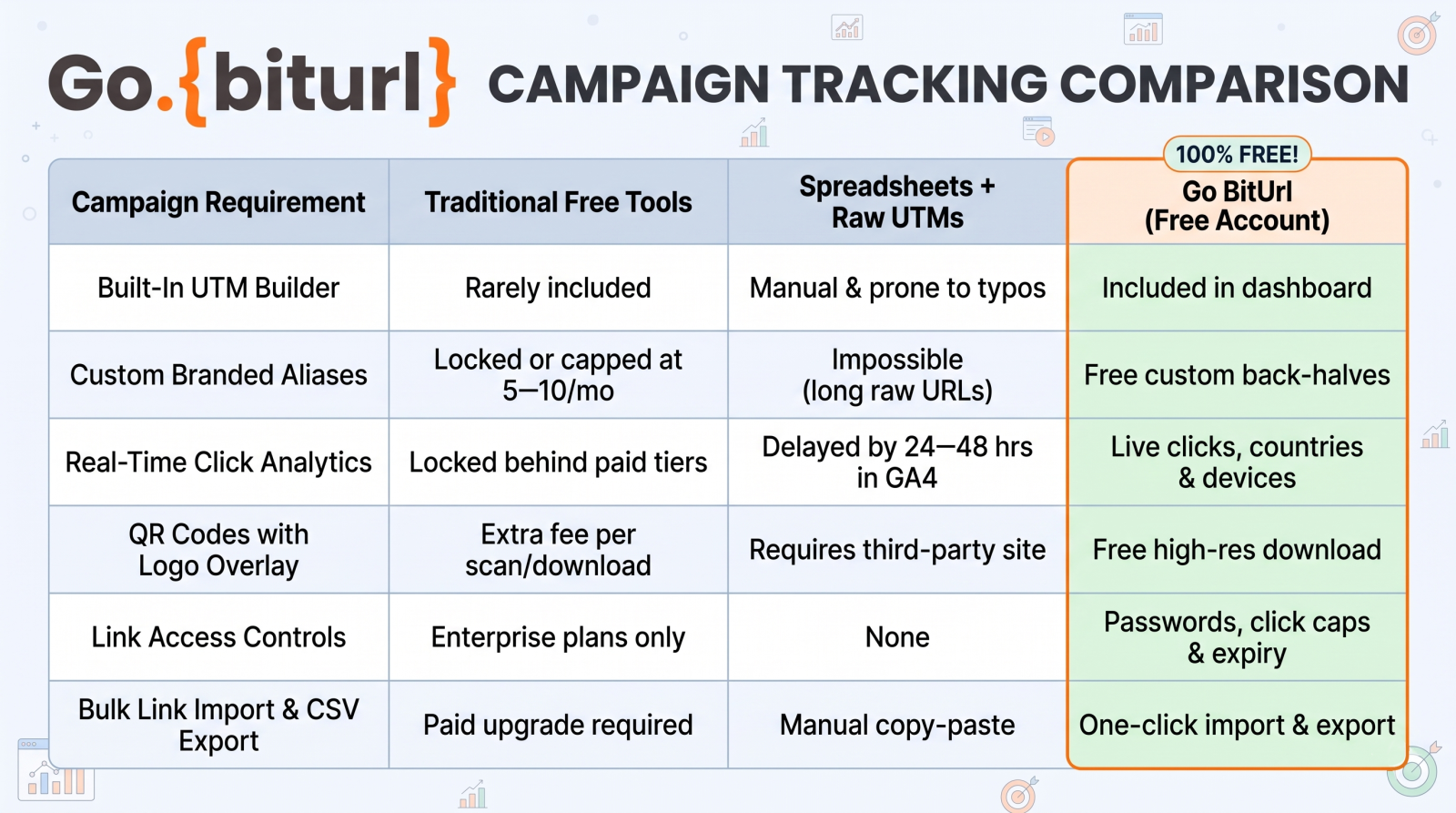
Here is how Go BitUrl handles both layers inside one unified workspace without charging a cent:
| Campaign Requirement | Traditional Free Tools | Spreadsheets + Raw UTMs | Go BitUrl (Free Account) |
|---|---|---|---|
| Built-In UTM Builder | Rarely included | Manual & prone to typos | Included in dashboard |
| Custom Branded Aliases | Locked or capped at 5–10/mo | Impossible (long raw URLs) | Free custom back-halves |
| Real-Time Click Analytics | Locked behind paid tiers | Delayed by 24–48 hrs in GA4 | Live clicks, countries & devices |
| QR Codes with Logo Overlay | Extra fee per scan/download | Requires third-party site | Free high-res download |
| Link Access Controls | Enterprise plans only | None | Passwords, click caps & expiry |
| Bulk Link Import & CSV Export | Paid upgrade required | Manual copy-paste | One-click import & export |
Step-by-Step: How to Track Any Marketing Campaign for Free
Whether you are promoting a D2C product launch, an affiliate offer, a webinar registration, or a local event, you can set up end-to-end tracking in under sixty seconds.
1. Append Clean Parameters with the Free UTM Builder
Start by defining where your traffic will come from using Go BitUrl's UTM Builder. Instead of typing parameters by hand, fill in the structured fields so your tags stay 100% consistent:
- Campaign Source (
utm_source): The specific platform sending the visitor (e.g.,instagram,whatsapp,newsletter,linkedin). - Campaign Medium (
utm_medium): The marketing format (e.g.,bio-link,broadcast,cpc,email). - Campaign Name (
utm_campaign): The specific promotion or launch identifier (e.g.,diwali-festive-saleorq4-webinar). - Campaign Content (
utm_content): Useful for A/B testing two different buttons or creatives pointing to the same page (e.g.,video-reel-1vs.story-link).
2. Cloak the Long URL with a Custom Alias
Once your UTM parameters are attached, don't share the raw, cluttered URL. Shorten it directly inside Go BitUrl and assign a Custom Alias.
Instead of sharing:
https://yourstore.com/collections/new-arrivals?utm_source=whatsapp&utm_medium=broadcast&utm_campaign=vip-drop
Your audience sees a clean, memorable call-to-action:
gobiturl.com/vip-drop
When a user clicks that short link, Go BitUrl records the click instantly and seamlessly forwards the full UTM-tagged URL to your website in milliseconds. You get the best of both worlds: high click-through rates on the front end, and spotless attribution on the back end.
3. Generate a Trackable QR Code for Offline Channels
Running print flyers, product packaging inserts, event banners, or restaurant table tents? Every short link created on Go BitUrl automatically generates a downloadable QR code with an optional custom logo overlay. Every physical scan is tracked right alongside your digital clicks in real time.
4. Set Expiration Dates or Click Limits for Flash Offers
If your campaign involves limited-time coupon codes, early-bird event tickets, or exclusive affiliate drops, leaving links active forever creates customer service headaches when the offer ends. With Go BitUrl, you can:
- Cap a link at a maximum number of clicks (e.g., deactivate automatically after the first 100 redemptions).
- Set an automatic expiration date so the campaign switches off the exact minute your sale ends.
- Add password protection for VIP client decks, influencer press kits, or gated community links.
5. Monitor Live Analytics and Export CSV Reports
As soon as your campaign goes live, open your Go BitUrl dashboard to watch performance unfold in real time. For every link, you can inspect:
- Total Clicks vs. Unique Visitors: Know whether 500 different people clicked your offer or 50 people clicked it ten times.
- Geographic Breakdown: See which countries are engaging most with your campaign.
- Device & Browser Split: Discover whether your buyers are browsing primarily on Android, iOS, or desktop so you can optimize your landing page layout.
- Top Referrers: Verify exactly which social network, website, or messaging app drove the traffic.
Need to share results with a client or your leadership team? Use the one-click CSV export to pull raw campaign data straight into Excel or Google Sheets.
4 Golden Rules for Clean Campaign Tracking
Even the best campaign tracking free tool works best when paired with smart naming habits. Follow these four rules to keep your analytics razor-sharp:
- Always use lowercase in UTM tags: Analytics platforms are case-sensitive. Tagging one link with
utm_source=Facebookand another withutm_source=facebookwill split your campaign data into two separate rows. Stick to lowercase across the board. - Use hyphens instead of spaces: Spaces in URLs convert into ugly
%20characters that can break link previews in messaging apps. Writesummer-sale-2026rather thansummer sale 2026. - Create a unique short link for each placement: If you promote the same blog post on LinkedIn, X (Twitter), and an email newsletter, generate three distinct short links (or use Go BitUrl's Bulk Import tool to create them all at once). That way, you can compare platform performance at a glance inside your link dashboard.
- Never put UTM tags on internal website links: Only use campaign tracking links for external traffic coming into your website. Adding UTM parameters to buttons inside your own site will overwrite the original traffic source in Google Analytics.
Start Tracking Your Campaigns Without Paywalls Today
Every click tells a story about what your audience cares about, which platforms convert, and where you should invest your marketing energy next. Stop flying blind with untagged links or overpaying for bloated enterprise subscriptions.
Create your free Go BitUrl account today to build your first UTM-tagged short link, generate custom QR codes, and watch your campaign clicks roll in live.
Frequently asked questions
Is Go BitUrl's campaign tracking tool really 100% free?
Yes. You can shorten links immediately on the homepage, and creating a free account unlocks the built-in UTM builder, custom aliases, real-time click and geographic analytics, downloadable QR codes, password protection, click limits, link expiration dates, bulk imports, and API keys without requiring a credit card.
Do short links mask or strip away my UTM parameters?
Not at all. When someone clicks your Go BitUrl short link, our server performs an instant redirect that passes all of your utm_source, utm_medium, and utm_campaign parameters intact to the final destination URL, so Google Analytics (GA4) and your ad pixels record every detail accurately.
Can I track offline campaigns alongside digital ads?
Absolutely. Every tracking link you create comes with a free, customizable QR code. By printing a dedicated QR code on your brochures, packaging, or event standees, you can compare offline scan volume directly against your social media and email link clicks in the same dashboard.
Keep reading
More stories you might like.
The Ultimate Bitly Alternative for Marketers: Why Smart Brands Are Switching to GoBitURL
Are restrictive link limits and steep pricing tiers holding your marketing campaigns back? Discover why performance marketers, agencies, and growing brands are migrating to GoBitURL—the all-in-one link management and custom QR platform built to maximize click-through rates and campaign ROI.
WhatsApp Link Short Kaise Kare? (Free & Easy Step-by-Step Guide 2026)
Kya aapka WhatsApp chat ya group link bahut lamba aur ajeeb dikhta hai? Janiye GoBitURL ki madad se WhatsApp link ko sirf 10 seconds mein short, clean aur custom kaise banayein.
Is a Paid URL Shortener Worth It? The Honest Cost-vs-Value Breakdown
Legacy link shorteners charge anywhere from $120 to $2,400+ a year just to unlock basic click analytics, custom aliases, and downloadable QR codes. Before you put another recurring SaaS subscription on your company card, here is an honest breakdown of what paid URL shorteners actually offer—and why 95% of marketers, creators, and growing businesses no longer need to pay for them.
Enjoyed this? Try the tool.
Shorten links, make QR codes and see who clicks — free.
0 Comments
Be the first to comment.
Leave a Comment