
Is a Paid URL Shortener Worth It? The Honest Cost-vs-Value Breakdown
Legacy link shorteners charge anywhere from $120 to $2,400+ a year just to unlock basic click analytics, custom aliases, and downloadable QR codes. Before you put another recurring SaaS subscription on your company card, here is an honest breakdown of what paid URL shorteners actually offer—and why 95% of marketers, creators, and growing businesses no longer need to pay for them.
If you have logged into a legacy URL shortener lately to grab a quick link for a product launch or a print flyer, you have likely hit a frustrating wall.
What used to be a simple, free utility across the web has quietly turned into an expensive software-as-a-service (SaaS) upsell. Want to change the random string of letters at the end of your link into a readable word? Upgrade to Pro. Want to see how many people actually clicked your link from India versus the United States? Enter your credit card. Need a high-resolution QR code that won't expire in 14 days? That will be $29 a month.
For digital marketers, D2C founders, content creators, and small business owners, this raises a fair question: Is a paid URL shortener worth it?
To answer that honestly, we need to look at how link pricing evolved, what you are actually buying when you pay $120 to $2,400+ per year for a link management subscription, and where the line sits between genuine enterprise value and artificial paywalls.
Why Did URL Shorteners Get So Expensive?
Ten years ago, shortening a URL was purely about saving character space on social media platforms. Today, a short link is a data routing checkpoint. Every time someone taps a short link or scans a QR code, the redirect server captures valuable metadata: the timestamp, the visitor's country, their mobile or desktop operating system, and the referring app or website.
Legacy platforms realized that businesses rely on this tracking data to measure return on investment (ROI). Instead of charging only high-volume enterprise corporations for heavy server usage, many providers began stripping basic features out of their free tiers to force everyday users into annual billing cycles.
Across the industry, standard entry-level and mid-tier paid plans typically charge for five core things:
- Removing severe monthly link caps (some free tiers limit you to as few as 5 to 10 links per month).
- Custom back-halves (aliases) so your link reads
/diwali-offerinstead of/3x9KpL. - Click and geographic analytics beyond a basic total click counter.
- Downloadable QR codes without watermarks or scan limits.
- Link lifecycle controls, such as setting a link to expire after a sale ends or locking it behind a password.
The problem isn't that these features aren't valuable—they are essential for modern marketing. The problem is that charging $10 to $35 every single month for standard database redirects is wildly disproportionate to what it costs to run them.
Paid URL Shorteners vs. Old Free Tools vs. Go BitUrl
For years, marketers thought they only had two choices: overpay for a bloated enterprise tool, or use a sketchy, bare-bones free shortener that offered zero tracking and risked injecting spam ads into the redirect flow.
At Go BitUrl, we built a third option: a modern, security-checked link management platform that gives marketers, developers, and businesses the complete professional toolkit inside a free account.
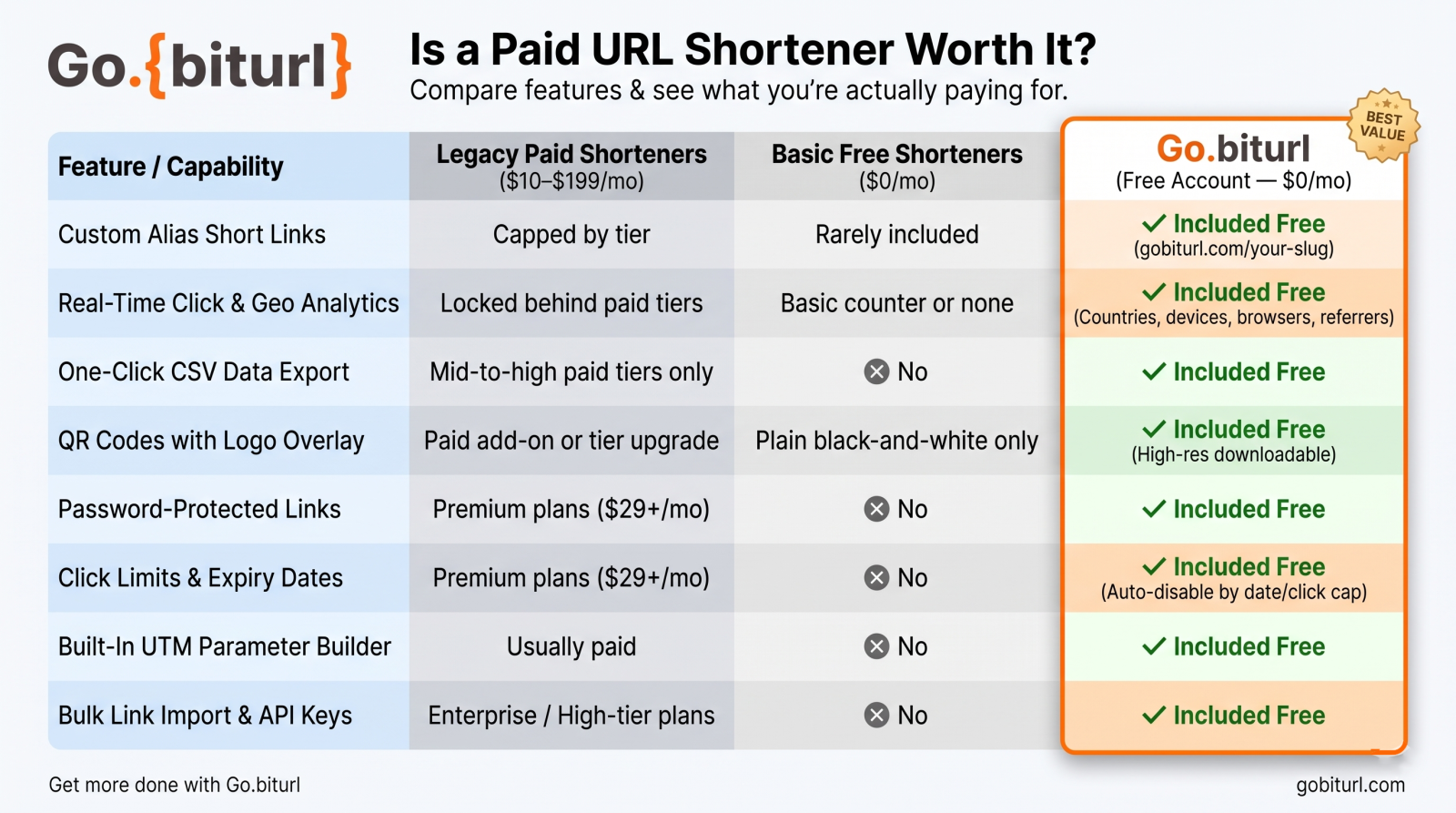
The side-by-side comparison below shows what your budget gets you across the market:
| Feature / Capability | Legacy Paid Shorteners ($10–$199/mo) | Basic Free Shorteners ($0/mo) | Go BitUrl (Free Account — $0/mo) |
|---|---|---|---|
| Custom Alias Short Links | Capped by tier | Rarely included | Included Free (gobiturl.com/your-slug) |
| Real-Time Click & Geo Analytics | Locked behind paid tiers | Basic counter or none | Included Free (Countries, devices, browsers, referrers) |
| One-Click CSV Data Export | Mid-to-high paid tiers only | No | Included Free |
| QR Codes with Logo Overlay | Paid add-on or tier upgrade | Plain black-and-white only | Included Free (High-res downloadable) |
| Password-Protected Links | Premium plans ($29+/mo) | No | Included Free |
| Click Limits & Expiry Dates | Premium plans ($29+/mo) | No | Included Free (Auto-disable by date or click cap) |
| Built-In UTM Parameter Builder | Usually paid | No | Include Free |
| Bulk Link Import & API Keys | Enterprise / High-tier plans | No | Include Free |
5 "Premium" Features You Should Never Have to Pay For
Before approving a yearly software invoice for a paid URL shortener, check whether you are simply paying to unlock features that are already free on Go BitUrl.
1. Custom Aliases That Build User Trust
Internet users are more cautious than ever about clicking unfamiliar links on WhatsApp, SMS, X (Twitter), and LinkedIn. A randomized URL looks suspicious and hurts your click-through rate (CTR). Customizing the slug—like gobiturl.com/summer-catalog—tells your audience exactly where they are headed. Charging a monthly fee just to let you type your own back-half slug is an outdated tax on branding.
2. Granular Link Access Controls (Passwords, Caps & Expiry)
Real-world campaigns aren't static. If you are sharing an early-access VIP product drop, a confidential client proposal, or an event registration form with limited seating, a permanent public link is a liability. On Go BitUrl, you don't need an enterprise subscription to control who reaches your destination URL:
- Password Protection: Require a passcode before the redirect completes.
- Click Limits: Automatically deactivate a link the exact moment it hits 50, 100, or 1,000 clicks—ideal for flash giveaways and first-come-first-served coupons.
- Expiration Dates: Schedule your promotional links to switch off automatically the minute your seasonal sale ends.
3. Actionable, Exportable Analytics
Knowing a link got 500 clicks is vanity data; knowing that 68% of those clicks came from mobile devices in India via WhatsApp is actionable business intelligence. Many paid URL shorteners hold your historical data hostage or charge extra to export it. Go BitUrl tracks total clicks, unique visitors, top countries, devices, browsers, and traffic referrers live—and lets you export the raw data to a CSV file in one click for your client or team spreadsheets.
4. Branded QR Codes for Print and Packaging
One of the biggest traps in the paid URL shortener industry is the "dynamic QR code bait-and-switch." Users generate a QR code during a free trial, print it on 5,000 product boxes or restaurant menus, and discover weeks later that the QR code stops scanning unless they pay a monthly ransom. On Go BitUrl, every short link comes with a free, downloadable QR code—complete with an optional custom logo overlay—that stays active for as long as you want your link to live.
5. Workflow Power Tools: UTM Builder, Bulk Import & API
If you are running multi-channel marketing campaigns, creating links one by one is a bottleneck. Instead of forcing you to juggle external spreadsheets for UTM tracking or paying hundreds of dollars for developer API access, Go BitUrl includes a native UTM Builder, CSV bulk link importing, team access, and developer API keys right inside your free dashboard.
When IS a Paid URL Shortener Actually Worth It?
To keep this breakdown 100% objective, there are specific scenarios where paying $300 to $1,500+ a month for a heavyweight enterprise link platform makes sense.
A paid enterprise contract is worth it if your organization requires:
- Hundreds of Custom Root Domains: If you are a global media conglomerate managing 250 separate country-specific branded domains under one umbrella.
- SAML Single Sign-On (SSO) & Custom Audit Logs: If your corporate cybersecurity policy mandates Okta/Azure AD enterprise authentication and strict compliance audit trails for 500+ employees.
- Contractual Uptime SLAs & Dedicated Account Managers: If you need a legally binding 99.99% Service Level Agreement with a dedicated support engineer on call.
(Quick note on a common confusion: If you are searching for "paid URL shorteners" meaning ad-monetized link networks that pay you pennies per 1,000 clicks by forcing your visitors to watch pop-up ads and countdown timers—stay far away. Those interstitial ad pages destroy audience trust, trigger browser malware warnings, and get your links banned on social media.)
How to Audit Your Current Link Management Spend
If you are currently paying for a URL shortener—or considering upgrading—ask yourself three quick questions:
- Are you paying for volume you don't use? Many paid tiers force you into a $29 or $99/month bracket where you pay for 1,500 monthly links just because you wanted password protection or CSV exports on 20 links.
- Are your analytics justifying the subscription cost? If you only check click counts, country breakdowns, device splits, and UTM campaign performance, paying $350 a year for that data cuts directly into your ad spend ROI.
- Could that budget drive actual traffic instead? Taking $300/year out of unnecessary SaaS overhead and putting it directly into Meta ads, Google search campaigns, or creator sponsorships will generate real clicks—while a free Go BitUrl account tracks every single one of them at zero cost.
Stop Paying a Monthly Tax on Your Clicks
Unless you are a Fortune 500 enterprise negotiating custom legal SLAs, a paid URL shortener is one SaaS subscription you can safely cross off your budget. You shouldn't have to ration your monthly links or pay a toll just to see which marketing channel is driving your sales.
Ready to get full control over your links without the paywalls? Create your free Go BitUrl account right now to start generating custom short links, branded QR codes, password-protected URLs, and real-time analytics in seconds.
Frequently asked questions
Why is Go BitUrl free when other URL shorteners charge $10 to $100+ a month?
Go BitUrl is engineered as a lean, high-performance link management platform without the bloated enterprise sales overhead of legacy providers. That allows us to offer core marketing features—like custom aliases, live analytics, QR codes, passwords, click limits, and API access—completely free of charge.
Do free short links on Go BitUrl expire if I don't pay?
No. Your links on Go BitUrl remain active indefinitely with zero surprise paywalls. The only time a Go BitUrl link stops working is if you intentionally set an expiration date or a maximum click limit inside your dashboard.
Are free URL shorteners safe for SEO and social media sharing?
It depends on the provider. Low-quality shorteners that allow spam or inject ads get blacklisted by social platforms. Go BitUrl actively spam-checks links and uses clean, fast redirects that pass users straight to your destination URL safely—protecting both your brand reputation and your click-through rates.
Keep reading
More stories you might like.
The Ultimate Bitly Alternative for Marketers: Why Smart Brands Are Switching to GoBitURL
Are restrictive link limits and steep pricing tiers holding your marketing campaigns back? Discover why performance marketers, agencies, and growing brands are migrating to GoBitURL—the all-in-one link management and custom QR platform built to maximize click-through rates and campaign ROI.
WhatsApp Link Short Kaise Kare? (Free & Easy Step-by-Step Guide 2026)
Kya aapka WhatsApp chat ya group link bahut lamba aur ajeeb dikhta hai? Janiye GoBitURL ki madad se WhatsApp link ko sirf 10 seconds mein short, clean aur custom kaise banayein.
Best Campaign Tracking Free Tool: How to Track Every Marketing Click in Real Time
Running marketing campaigns without accurate click data is the fastest way to burn through your budget. Discover how to use a all-in-one campaign tracking free tool to build spotless UTM links, cloak ugly tracking parameters behind custom short URLs, and monitor real-time audience analytics without hitting a paywall.
Enjoyed this? Try the tool.
Shorten links, make QR codes and see who clicks — free.
0 Comments
Be the first to comment.
Leave a Comment