
Bitly vs. Free URL Shorteners: Why Marketers Are Switching to Go BitUrl
Bitly used to be the default choice for shortening links, but strict monthly caps and paywalled analytics have changed the game. See how Bitly stacks up against modern free URL shorteners like Go BitUrl—and find out which tool actually gives you the features you need without the enterprise price tag.
For over a decade, Bitly was practically synonymous with link shortening. If you had a bulky, parameter-heavy URL that looked terrible in an email or social post, you pasted it into Bitly, grabbed your short link, and moved on.
Today, the landscape looks completely different.
If you have logged into a free Bitly account lately, you have likely run into a frustrating wall: strict monthly link caps, locked click analytics, and interstitial ad preview pages shown to your visitors before they reach your website. What used to be an effortless free utility has evolved into an enterprise-focused platform where essential features sit behind steep annual subscriptions.
This shift has sparked a major question for creators, small businesses, and digital marketers: In a battle of Bitly vs. a free URL shortener, do you actually need to pay hundreds of dollars a year just to manage and track your links?
Let’s break down the real differences between Bitly’s current tiers, generic legacy shorteners, and modern, feature-packed free platforms like Go BitUrl.
The Problem with Bitly’s "Free" Plan
To understand why so many users are searching for a Bitly alternative, you only need to look at what Bitly’s free tier currently offers—and what it takes away:
- The 5-Link Monthly Ceiling: Bitly’s free plan restricts you to just 5 short links per month (and only 3 custom back-halves). If you share links weekly on LinkedIn, X, WhatsApp, or in a newsletter, you will burn through your monthly quota in a few days.
- Zero Click Analytics: Shortening a link is only half the job; knowing whether people clicked it is where the real value lies. On Bitly’s free plan, click and scan analytics are completely locked. Even stepping up to their entry-level paid tier ($10/month, billed annually at $120/year) only unlocks 30 days of historical click data.
- Just 2 QR Codes a Month: QR codes are essential for print packaging, event flyers, and menus. Capping free users at two codes a month makes testing offline campaigns nearly impossible.
- Ad Preview Pages: Free Bitly links can trigger an ad-supported preview page before redirecting your visitor, adding friction and hurting trust when you send links to clients or customers.
- Enterprise Gatekeeping on Security & APIs: Want to password-protect a sensitive link, set an expiration date, or set a click cap for a limited-time offer? On Bitly, advanced link controls are either nonexistent or locked behind upper-tier plans costing hundreds of dollars per month.
Legacy Free Shorteners vs. Modern Link Management
When users outgrow Bitly’s free limits, many test out older, generic free URL shorteners. However, basic free tools often come with their own compromises:
- Random, Unmemorable Strings: Many basic tools force you to use gibberish slugs (like
short.url/x8Qp9z), which look spammy and lower your click-through rate (CTR). - No Link Lifecycle Controls: Once a link is live on a basic shortener, you can't turn it off, cap its traffic, or protect it with a password.
- No Data Export or UTM Tools: You are left guessing which social channel or campaign actually drove the traffic.
That gap is exactly why we built Go BitUrl—to bridge the divide between bare-bones free tools and overpriced enterprise software.
Head-to-Head Comparison: Bitly vs. Generic Free Shorteners vs. Go BitUrl
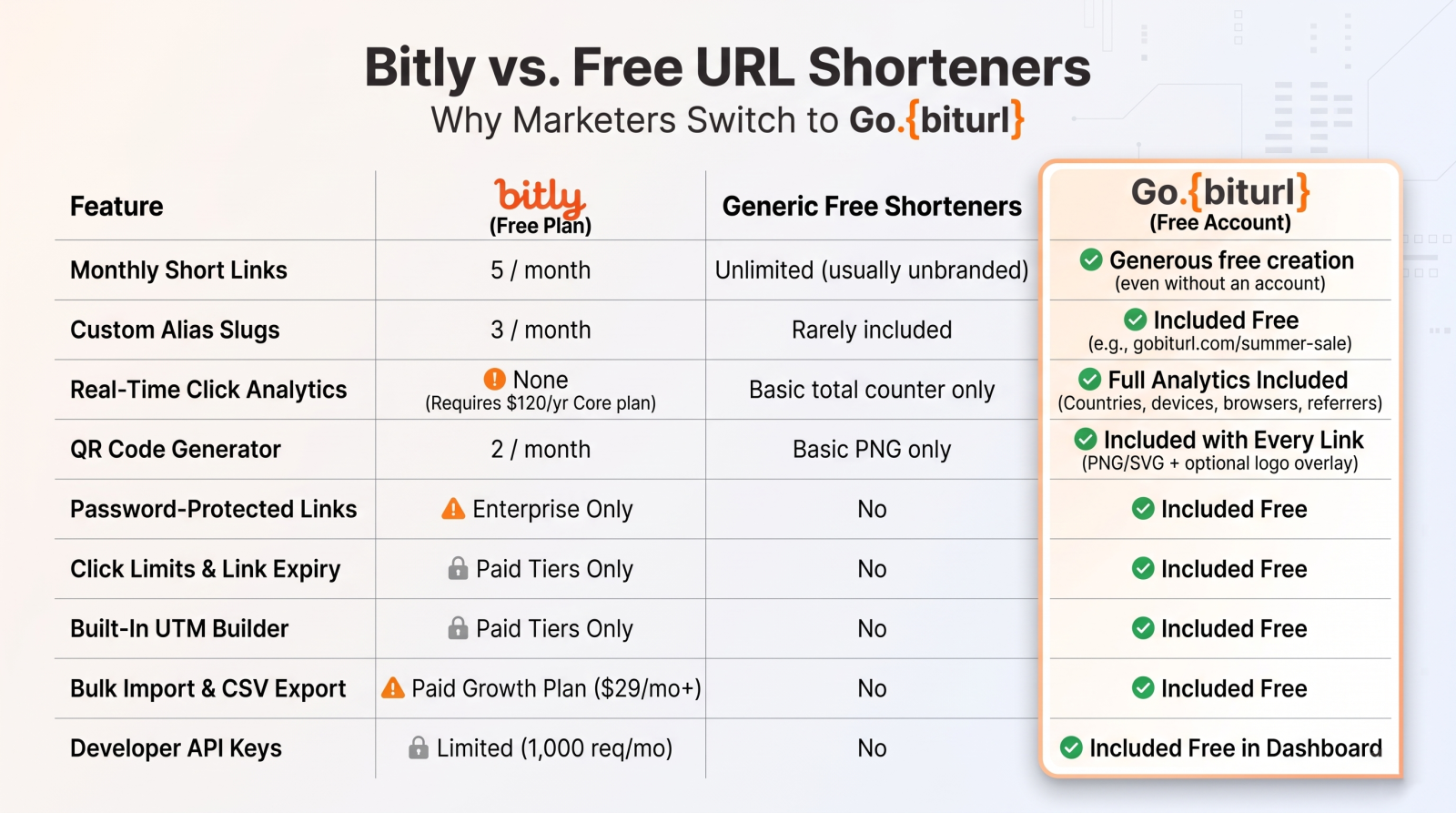
Here is how Bitly’s free plan compares directly against generic free shorteners and a free account on Go BitUrl:
| Feature | Go BitUrl (Free Account) | Bitly (Free Plan) | Generic Free Shorteners |
|---|---|---|---|
| Monthly Short Links | Generous free creation (even without an account) | 5 / month | Unlimited (usually unbranded) |
| Custom Alias Slugs | Included Free (e.g., gobiturl.com/summer-sale) | 3 / month | Rarely included |
| Real-Time Click Analytics | Full Analytics Included (Countries, devices, browsers, referrers) | None (Requires $120/yr Core plan) | Basic total counter only |
| QR Code Generator | Included with Every Link (PNG/SVG + optional logo overlay) | 2 / month | Basic PNG only |
| Password-Protected Links | Included Free | Enterprise Only | No |
| Click Limits & Link Expiry | Included Free | Paid Tiers Only | No |
| Built-In UTM Builder | Included Free | Paid Tiers Only | No |
| Bulk Import & CSV Export | Included Free | Paid Growth Plan ($29/mo+) | No |
| Developer API Keys | Included Free in Dashboard | Limited (1,000 req/mo) | No |
5 Reasons Go BitUrl Wins the "Bitly vs. Free URL Shortener" Debate
When you choose a link shortener, you aren't just shrinking characters—you are controlling how your audience experiences your brand. Here is what sets Go BitUrl apart.
1. Real-Time Analytics You Don't Have to Pay to See
A link without analytics is a blindfold for your marketing. With Go BitUrl, you don't need to enter a credit card to see how your campaign is performing. Every link inside your free dashboard tracks total clicks, unique visitors, top countries, device types, browsers, and traffic referrers in real time. Better yet, you get one-click CSV export so you can drop your data straight into client reports or spreadsheets.
2. Full Link Access Control: Passwords, Click Limits, and Expiration Dates
Most URL shorteners treat every link as permanent and public. In the real world, marketers and businesses need granular control:
- Password-Protected Links: Sharing an internal document, VIP ticket link, or client preview? Lock your short link behind a password so only authorized visitors are redirected.
- Click Limits: Running a flash giveaway for the first 100 customers? Set a maximum click cap, and the link automatically deactivates the moment it hits click #100.
- Expiration Dates: Promoting a seasonal sale or webinar? Schedule your link to switch off automatically once the event ends.
3. Custom Aliases That Boost Click-Through Rates
Audience trust is fragile. People hesitate to click random strings of letters and numbers, especially on SMS or WhatsApp. Using Custom Alias Short Links, you can customize the back-half of your URL into a clean, readable call-to-action—turning a messy 120-character URL into [gobiturl.com/winter-launch](https://gobiturl.com/winter-launch). Clean links communicate transparency and noticeably improve click rates.
4. High-Resolution QR Codes with Logo Overlays
Every short link created on Go BitUrl automatically comes with a free downloadable QR code. Unlike platforms that ration your QR creations or force watermarks onto your downloads, you can export crisp PNG or scalable SVG files ready for print packaging, posters, and table tents—complete with an optional custom logo overlay in the center.
5. Built-In Power Tools for Marketers & Developers
Instead of juggling five different browser tabs to launch a campaign, Go BitUrl packs an entire marketing toolkit inside your free dashboard:
- UTM Builder: Append clean
utm_source,utm_medium, andutm_campaigntags to your destination URLs before shortening them so your Google Analytics data stays spotless. - Bulk Link Import: Launch dozens of campaign links at once without manual copy-pasting.
- API Keys & Team Access: Automate link generation directly inside your apps or workflows without being forced onto a $500+/month enterprise contract.
When Should You Use Bitly vs. Go BitUrl?
To be completely fair, Bitly still makes sense for a very specific segment: massive Fortune 500 enterprises with multi-thousand-dollar monthly software budgets that require custom SLA uptime contracts, SAML single sign-on (SSO), and dedicated account managers.
However, if you are a digital marketer, content creator, e-commerce brand, event host, developer, or growing business, paying $120 to $2,400+ per year just to remove link caps and view basic click data is unnecessary overhead.
Ready to Shorten Links Without the Paywalls?
Stop rationing your monthly links or guessing how many people scanned your QR code. Experience how effortless link management should be.
👉 Create your free Go BitUrl account today or shorten your first link right now—complete with custom aliases, downloadable QR codes, and live analytics in seconds.
Frequently asked questions
Is Go BitUrl really free to use?
Yes! You can shorten links immediately on the homepage without even creating an account. Signing up for a free account takes seconds and unlocks custom aliases, real-time analytics, password protection, click limits, expiration dates, bulk imports, and API access.
If I switch from Bitly to Go BitUrl, will my old Bitly links break?
No. Any bit.ly links you have already shared or printed on materials will continue to work. You can simply start creating all of your new campaign links and QR codes on Go BitUrl—or use our Bulk Import tool to recreate your most important active links in seconds.
Do short links on Go BitUrl expire automatically?
Never—unless you want them to. Your short links remain active indefinitely with no arbitrary time limits, though you always have the option to set a custom expiration date or maximum click limit on any link.
Keep reading
More stories you might like.

How to Shorten Event Links to Boost Registrations and Track RSVPs (Complete Guide)
Long, messy event registration URLs look untrustworthy and kill your ticket conversion rates. Discover how shortening your event links with GoBitURL helps you build brand trust, share effortlessly across flyers and social media, and track every single RSVP click in real time.

How to Use Expiry Date Links for Events and Festive Sales in India
Hosting a webinar, college fest, or Diwali flash sale? Learn how setting an expiration date on your short links creates urgency, boosts conversions, and saves your brand from dead-link embarrassment.

What is Claude AI? Complete Guide to Claude Pro, India Subscription Price, Claude Code, Cowork & Certifications
Discover everything about Anthropic’s Claude AI—from Claude Opus 5.5, Sonnet 5.5, and Opus 4.7 to India subscription pricing in INR, Claude Code CLI, Claude Cowork desktop automation, and the official Claude Certified Architect exam. Plus, learn how developers and creators use GoBitURL to manage and protect shared AI workflows.
Enjoyed this? Try the tool.
Shorten links, make QR codes and see who clicks — free.
0 Comments
Be the first to comment.
Leave a Comment