
How to Master Google Analytics UTM Tracking (And Keep Your Links Clean with GoBitURL)
Stop guessing where your website traffic comes from. Learn how to set up Google Analytics 4 (GA4) UTM parameters step-by-step, avoid common attribution mistakes, and turn clunky tracking URLs into sleek, high-converting branded short links with GoBitURL.
Running marketing campaigns without proper tracking is like driving with a blindfold on. You know you are moving, and you know you are spending budget, but you have no idea which turns are actually getting you closer to your destination.
When you check your Google Analytics 4 (GA4) dashboard and see a huge chunk of your traffic lumped into "Direct" or "Unassigned," it means your attribution data is broken. When a user clicks a link in an email newsletter, a WhatsApp message, or a social media bio, analytics platforms often lose the referrer data along the way.
That is where UTM tracking comes in. By adding simple snippets of code to the end of your URLs—and pairing them with a link shortener like GoBitURL—you can track every single click down to the exact button, post, or influencer that generated it.
What is UTM Tracking in Google Analytics?
UTM stands for Urchin Tracking Module (a throwback to Urchin Software, the company Google acquired in 2005 to create Google Analytics).
UTM parameters are short text codes that you add to the end of a URL after a question mark (?). When someone clicks a link containing UTM tags, Google Analytics reads those tags and categorizes the visitor's session with 100% accuracy, regardless of whether they came from a mobile app, a PDF, an email client, or a QR code.
Here is what a raw URL vs. a UTM-tracked URL looks like:
- Standard URL:
[https://gobiturl.com/features](https://gobiturl.com/features) - UTM-Tracked URL:
[https://gobiturl.com/features?utm_source=linkedin&utm_medium=social&utm_campaign=spring_launch](https://gobiturl.com/features?utm_source=linkedin&utm_medium=social&utm_campaign=spring_launch)
The 5 Core UTM Parameters (Plus 3 Modern GA4 Tags)
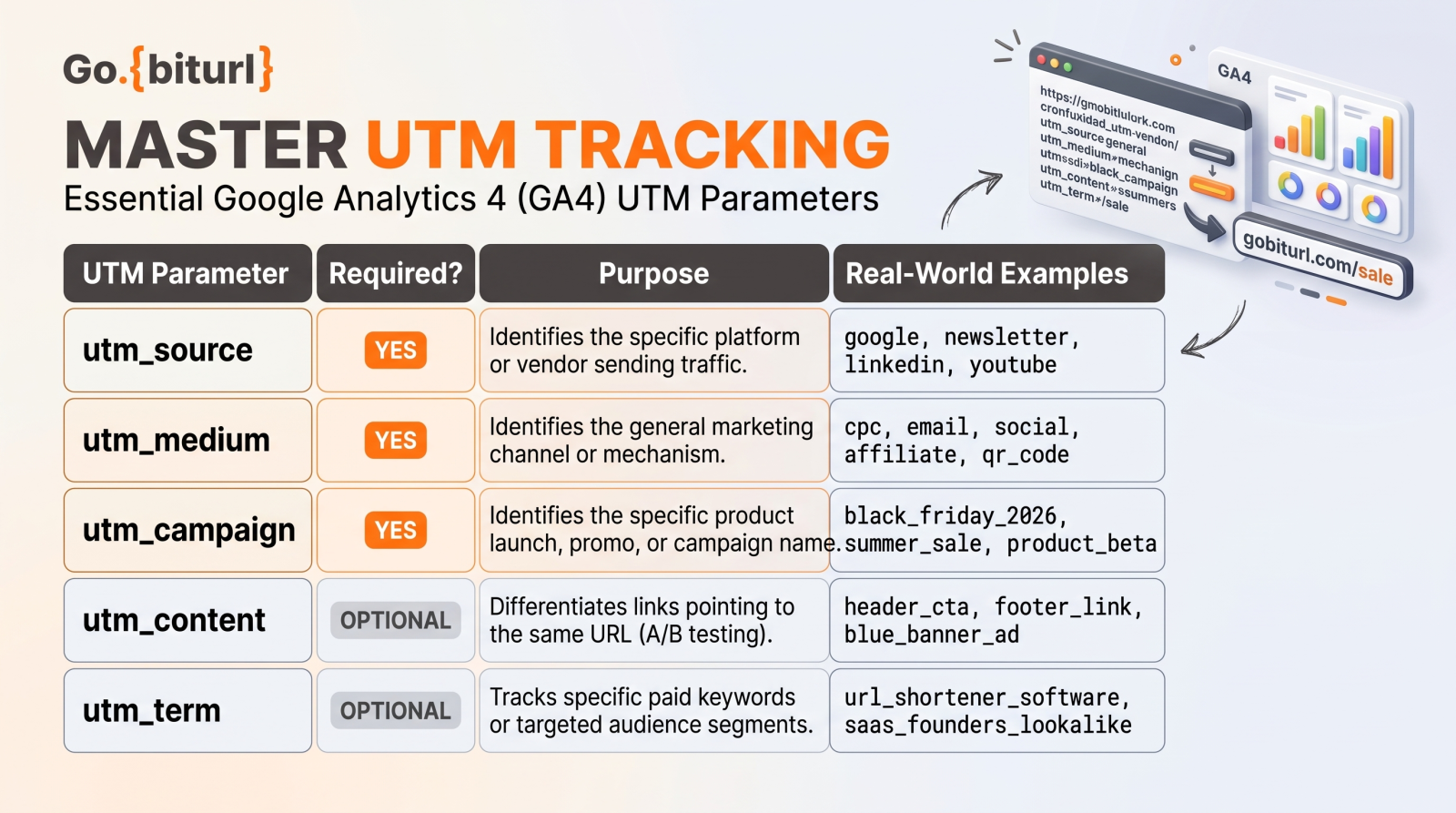
To build a tracking link that works seamlessly with Google Analytics 4, you need to understand the five standard parameters. The first three are required for accurate reporting, while the other two are optional for deeper testing.
| UTM Parameter | Required? | Purpose | Real-World Examples |
|---|---|---|---|
| utm_source | Yes | Identifies the specific platform or vendor sending the traffic | google, newsletter, linkedin, youtube |
| utm_medium | Yes | Identifies the general marketing channel or mechanism. | cpc, email, social, affiliate, qr_code |
| utm_campaign | Yes | Identifies the specific product launch, promo code, or campaign name. | black_friday_2026, summer_sale, product_beta |
| utm_content | Optional | Differentiates links that point to the same URL within the same ad or email. | header_cta, footer_link, blue_banner_ad |
| utm_term | Optional | Tracks the specific paid keywords or audience segments targeted. | url_shortener_software, saas_founders_lookalike |
Bonus: Newer GA4 Parameters You Should Know
If you want even deeper granularity inside Google Analytics 4, Google now supports three additional parameters:
utm_id: A unique campaign ID (e.g.,camp_402) Required if you plan to upload external non-Google ad cost data into GA4.utm_source_platform: Identifies the buying platform responsible for directing traffic (e.g.,Meta_Ads_Manager,Search_Ads_360).utm_creative_format: Describes the visual type of media used (e.g.,carousel,60s_reel,static_infographic).
The Hidden Problem with UTM Links (And How GoBitURL Solves It)
While UTM parameters are a dream for data analysts, they create a massive headache for marketers: they make your links look terrible.
Imagine sharing a link like this in an SMS campaign, on an Instagram story, or in a cold outreach email: [https://yourwebsite.com/pricing?utm_source=outreach_email&utm_medium=email&utm_campaign=q4_enterprise_push&utm_content=signature_link_v2](https://yourwebsite.com/pricing?utm_source=outreach_email&utm_medium=email&utm_campaign=q4_enterprise_push&utm_content=signature_link_v2)
Long, parameter-heavy URLs hurt your marketing in three ways:
- They look like spam: Everyday users are hesitant to click links filled with strange symbols (
?,&,=,%20) because they resemble phishing links. - They break across platforms: Messaging apps and email clients sometimes truncate long URLs, breaking the tracking tags right down the middle.
- They ruin visual copy: Dropping a 150-character URL into a clean social media post destroys the visual appeal of your caption.
The Fix: Shorten Your UTM Links with GoBitURL
Instead of sharing raw UTM links, smart marketers paste their long, tagged URL directly into GoBitURL.
GoBitURL compresses that massive string of tracking parameters into a clean, trustworthy link (like [gobiturl.com/offer](https://gobiturl.com/offer)). When a user clicks your short link, GoBitURL instantly redirects them to your destination page while passing 100% of the UTM data straight into your Google Analytics account.
Even better, using GoBitURL gives you dual-layer analytics:
- Layer 1 (GoBitURL Dashboard): Get instant, real-time click counts, device data, and geographic insights the second your link goes live.
- Layer 2 (Google Analytics 4): Track what happens after the click—such as time on page, bounce rate, cart additions, and final revenue conversions.
Where to Find Your UTM Data in Google Analytics 4
Many marketers set up UTM links but get lost trying to find the results inside GA4’s updated interface. Follow these four steps to view your campaign performance:
- Log in to your Google Analytics 4 property.
- On the left-hand navigation menu, click Reports > Acquisition > Traffic acquisition.
- Scroll down to the data table. By default, the primary dimension column is set to Session default channel group. Click the dropdown arrow on that header and change it to Session campaign (or Session source / medium).
- To view
utm_contentorutm_term: Click the blue+icon next to the primary dimension dropdown to add a secondary dimension, then search for and select Session manual ad content (utm_content) or Session manual term (utm_term).
5 Golden Rules for Flawless UTM Tracking
A single typo in a UTM tag can fragment your reporting and ruin a month's worth of data. Follow these five rules to keep your analytics pristine:
1. Always Use Lowercase Letters
UTM tags are strictly case-sensitive. If you tag one link with utm_source=LinkedIn, another with utm_source=linkedin, and a third with utm_source=LINKEDIN, Google Analytics will split your traffic into three separate rows. Force lowercase across all team members.
2. Use Underscores or Hyphens—Never Spaces
Spaces in URLs get converted into %20 by web browsers, turning summer sale into summer%20sale. This looks messy and is difficult to read. Stick to underscores (summer_sale) or hyphens (summer-sale) and keep that choice consistent across your organization.
3. Never Use UTM Tags on Internal Links
This is the #1 mistake marketers make. Never put a UTM-tracked link on a banner, blog post, or menu button that links from one page of your website to another page on your same website.
Why? If a user finds your site via an organic Google search, clicks an internal blog banner tagged with utm_source=blog_banner, GA4 immediately terminates their "Organic Search" session and starts a brand-new session attributed to "blog_banner." You completely erase the true source that brought the customer to your site in the first place.
4. Align With GA4's Default Channel Groupings
GA4 automatically buckets your traffic into channels like Paid Social, Email, and Organic Shopping based on how you name your utm_medium. Stick to standard naming conventions:
- Use
emailfor email marketing. - Use
cpcorppcfor paid search ads. - Use
paid_socialfor paid social media ads, andsocialfor organic posts. - Use
affiliatefor partner links.
5. Hide Your Strategy From Competitors
When you publish raw UTM parameters publicly, any competitor who clicks your ad can immediately see your exact naming conventions, audience targeting (utm_term), and A/B test variations (utm_content) right in their browser's address bar. Shortening your links with GoBitURL masks the parameters prior to the click, keeping your campaign architecture cleaner in your ad copy.
Ready to Build Smarter Tracking Links?
UTM tracking takes the guesswork out of marketing, showing you exactly which channels generate revenue and which ones waste your budget. By combining Google Analytics 4 with GoBitURL, you get enterprise-grade attribution without ever having to share an ugly, broken, or spammy-looking link again.
Head over to the GoBitURL Dashboard today to shorten your first UTM campaign link and start tracking your clicks with total clarity.
Frequently asked questions
Does shortening a UTM link with GoBitURL break Google Analytics tracking?
No, shortening a UTM link with GoBitURL does not break or strip away your tracking data. GoBitURL uses standard 301/302 HTTP redirects that preserve 100% of your URL parameters. When a user clicks your short link, they are seamlessly forwarded to the full destination URL, passing utm_source, utm_medium, and utm_campaign tags directly into Google Analytics 4 (GA4).
Do UTM parameters affect my website’s SEO or Google rankings?
UTM parameters do not directly boost or harm your SEO rankings, provided your website uses proper canonical tags (rel="canonical"). Because adding UTM codes creates multiple URL variations for the same page, search engines could technically view them as duplicate content. Setting a self-referencing canonical tag on your landing pages tells Google to ignore the UTM string and index only the clean, primary URL.
Which UTM parameters are mandatory for Google Analytics 4?
- utm_source (identifies the platform, such as google, newsletter, or linkedin)
- utm_medium (identifies the traffic channel, such as cpc, email, or social)
- utm_campaign (identifies the specific promotion, such as autumn_sale_2026)
While utm_term and utm_content are optional, they are highly recommended for paid keyword tracking and A/B testing ad creatives.
Why is my UTM traffic showing up as "Unassigned" in GA4?
Traffic usually lands in the "Unassigned" bucket in GA4 when your utm_source and utm_medium values do not match Google's strict Default Channel Grouping rules. For example, using utm_medium=e-mail instead of utm_medium=email, or using capital letters like Social instead of social, prevents GA4 from automatically categorizing the session. Always use lowercase letters and stick to Google’s predefined medium names.
Can I use UTM tracking codes on internal links on my own website?
Never use UTM parameters on internal links. If a visitor lands on your homepage via a paid Google Ad and clicks an internal menu link or banner containing a UTM tag, GA4 will overwrite the original Google Ad attribution and start a new session credited to your internal banner. Use GA4 custom events and click triggers to measure internal navigation instead.
How do I track offline marketing campaigns (like print flyers) with UTM links?
You can track offline materials by combining UTM parameters with a custom short link or QR code generated through GoBitURL. First, create a URL with tags like utm_source=print_flyer&utm_medium=qr_code&utm_campaign=local_event. Next, paste that long URL into GoBitURL to create a short, memorable link or scannable QR code. Every scan or typed visit will register directly in your GA4 dashboard.
What is the difference between utm_source and utm_medium?
Think of utm_medium as the broad vehicle delivering the traffic (how they got to you), and utm_source as the specific origin (where they came from). For example, if you run a promoted post on X (formerly Twitter), your medium is paid_social (the channel mechanism) and your source is twitter (the specific platform).
Keep reading
More stories you might like.

The Ultimate Bitly Alternative for Marketers: Why Smart Brands Are Switching to GoBitURL
Are restrictive link limits and steep pricing tiers holding your marketing campaigns back? Discover why performance marketers, agencies, and growing brands are migrating to GoBitURL—the all-in-one link management and custom QR platform built to maximize click-through rates and campaign ROI.
WhatsApp Link Short Kaise Kare? (Free & Easy Step-by-Step Guide 2026)
Kya aapka WhatsApp chat ya group link bahut lamba aur ajeeb dikhta hai? Janiye GoBitURL ki madad se WhatsApp link ko sirf 10 seconds mein short, clean aur custom kaise banayein.
Best Campaign Tracking Free Tool: How to Track Every Marketing Click in Real Time
Running marketing campaigns without accurate click data is the fastest way to burn through your budget. Discover how to use a all-in-one campaign tracking free tool to build spotless UTM links, cloak ugly tracking parameters behind custom short URLs, and monitor real-time audience analytics without hitting a paywall.
Enjoyed this? Try the tool.
Shorten links, make QR codes and see who clicks — free.
0 Comments
Be the first to comment.
Leave a Comment